
My workout didn't save after I ended it. Can I get it back?
Usually it’s waiting on your watch. A workout you ended is saved on the watch and sent to your iPhone when the two are connected. Open Atlon on both, with the phone near the watch, and it goes across. If Atlon quit during the workout, Apple Health still keeps it, but Atlon’s sets, reps and points can’t be recovered.
How it works
You ended the workout and saw your results on the watch
The workout is saved on your watch the moment it ends.
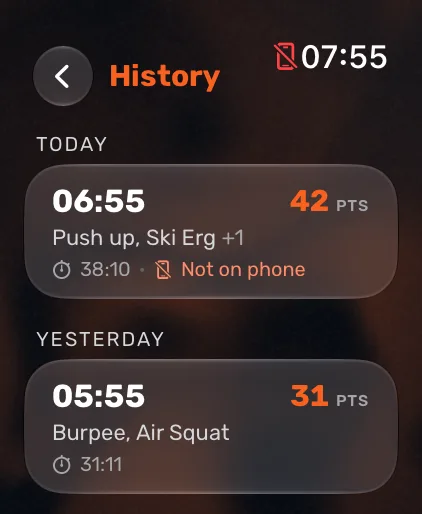
- On your watch, open Atlon’s history (the clock button on the start screen). A workout that hasn’t reached your phone yet says Not on phone.
- Open Atlon on your iPhone and keep the phone near the watch, both unlocked and connected. Then open Atlon on the watch. Atlon checks with the phone and sends anything that’s missing.
- Once your iPhone has it, the workout is processed and appears in the Workouts tab. Showing the full workout takes a moment and needs an internet connection.
Atlon quit during the workout
If Atlon closes while a workout is running (for example after a crash), watchOS keeps the workout session going and relaunches Atlon, which ends it and saves it to Apple Health with the heart rate and calories collected. So the workout and its calories still count for your Activity rings, but Atlon’s own recording ended with the crash. There’s no set list or points for it in Atlon.
You chose “Don’t save”
A very short Just train session (under 3 minutes, 3 sets or fewer) is treated as a test, and its results offer to drop it. A workout you chose not to save is deleted from the watch and can’t be recovered.
Limits
- The watch keeps your last 20 workouts. Older ones are removed from the watch, even one that never reached your phone. Open Atlon on your iPhone regularly so nothing waits on the watch for long.
- A crash mid-workout loses Atlon’s data for that workout. Apple Health keeps the workout, heart rate and calories.
- Deleted workouts can’t be restored. Deleting a workout or recording in the Workouts tab removes it from your account.
Related questions
Updated