
Should I record the whole class (warm-up, strength, WOD) or just the WOD?
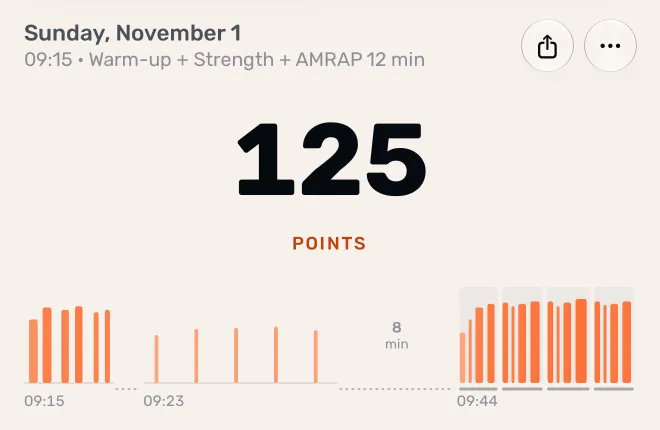
Record the whole class, one part at a time, in the mode that fits each part: Just train for the warm-up, Strength for the lifting, then AMRAP, EMOM or RFT for the WOD. Recordings that start within an hour of the last one ending join into one workout, so the class shows up as one workout with every set.
How it works
- Warm-up: start Just train, and end it when the warm-up is done.
- Strength: start Strength. Set the weight while you load the bar; Atlon logs each set.
- WOD: start the mode that matches the clock (AMRAP, RFT, EMOM or Intervals).
- On your iPhone: the Workouts tab shows the class as one workout. The strip and heart-rate chart put the recordings side by side, with the breaks between them. Your points, exercises and heart rate cover the whole class.
- Add the plan once: tap Add the workout and snap the whiteboard. One plan covers all the recordings.
Recording the parts separately gives each part the right timer, and Strength gets its own set log.
Just the WOD?
That works too. You’ll miss the points and reps from the warm-up and strength, and the plan will only cover what you recorded.
Two classes in a day
If more than an hour passes between the end of one recording and the start of the next, Atlon starts a new workout. A day with a morning and an evening class shows two workouts, with a switch to pick between them.
Limits
- The grouping is automatic: recordings less than an hour apart always join, and you can’t split or join workouts by hand.
- Deleting one recording leaves the rest of the workout in place.
- Effort and work time leave out strength and warm-ups, because they measure conditioning.
- Workouts recorded before Atlon grouped recordings may still show each recording on its own.
Related questions
- Does Atlon recognise exercises in Strength mode?
- What are Atlon points and how are they calculated?
- How does Atlon measure effort?
Updated