
What's in Atlon's monthly recap, and when does it arrive?
Your monthly recap arrives on the 3rd of every month, with a notification at 10:00 your time. It shows last month’s points against the month before, your month day by day, your week streak, your top exercises, and how you compare with other Atlon athletes. Every past recap stays on the Workouts calendar.
How it works
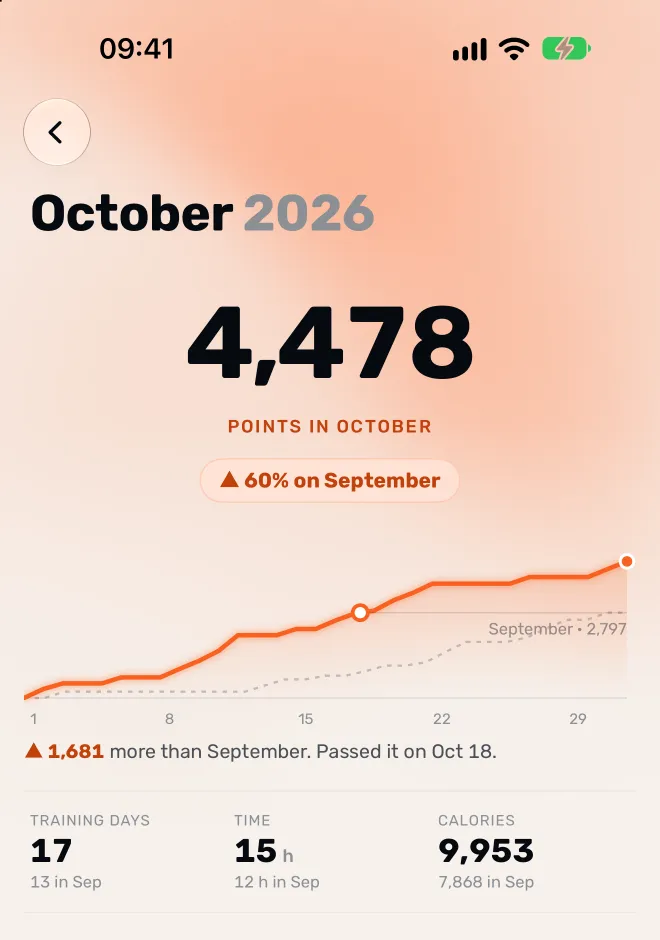
The recap is a page in the Atlon app on your iPhone. It covers:
- Points for the month, and how many more or fewer than the month before. If you passed last month’s total, it says on which day.
- Your month day by day: a running total of your points across the month, set against the month before.
- Your streak: whether you trained every week of the month, or when your streak broke and restarted.
- Your top exercises, with what you did (reps, calories, distance or time) and the change in points from the month before.
- Among Atlon athletes: how your points or your training days compare with other people using Atlon.
Your first recap starts from your first workout, so the days before it are faded.
Where to find it
- The notification on the 3rd opens it.
- Past recaps are on the Workouts calendar.
Limits
- The recap covers whole calendar months. The month so far is on Home, not in a recap.
- Like everywhere in Atlon, points and totals are rounded down.
- With no workouts in the month before, there’s nothing to compare with yet.
Related questions
Updated