
Can I use my iPhone as a gym timer?
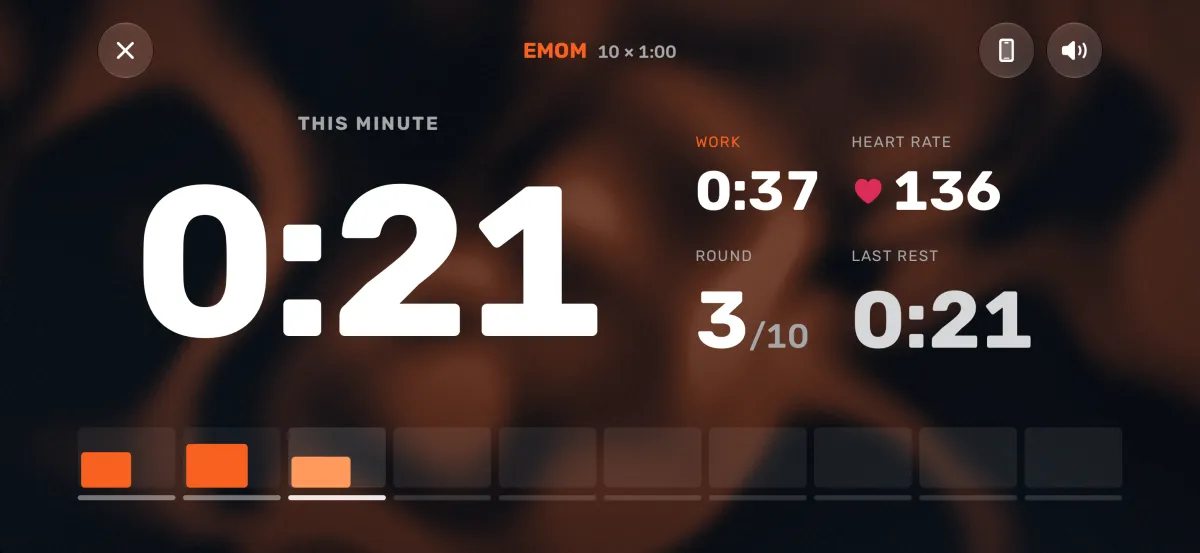
Yes. Prop your iPhone up with Atlon open, start a workout on your Apple Watch, and the phone shows it full screen: the clock, the round and your work and rest, big enough to read across the room, with the countdown beeps gyms use. Your watch stays in control, so there’s no second timer to start in sync.
How it works
- Open the big screen: on your iPhone, tap the stopwatch circle next to the tab bar. With nothing running, it shows what the watch has ready, for example “AMRAP · 12:00 ready on your watch”. The phone stays awake while this screen is open.
- Start on your watch: press play. The phone’s countdown starts with the watch’s. If Atlon is open on your iPhone, the big screen also opens by itself when a workout starts.
- During the workout: the phone shows what the watch shows, in the same places, scaled up. Rounds, pauses and the end all come from the watch.
- Sound: short beeps for 3, 2, 1, a long beep for go and each interval change, and a low one at the end. They play with the silent switch on, over your music. A toggle on the big screen turns them off.
- Landscape: the big screen can turn sideways, even with rotation lock on.
It works in every mode: Just train, Strength, AMRAP, RFT, EMOM and Intervals. In RFT it shows your current round.
Limits
- The iPhone only shows the workout. You can’t start, pause or count rounds from the phone.
- The phone needs to be near the watch. If it loses the watch, the workout carries on on your wrist, and the big screen picks it up again when the phone is back in range.
- The setting Show workouts on iPhone (in Atlon’s Settings on your iPhone) must be on. It’s on by default.
- You need your own Apple Watch running the workout. The big screen isn’t a standalone timer.
Related questions
- How is Atlon different from a WOD timer app?
- How do I set up an EMOM on Apple Watch?
- Does Atlon work without my iPhone nearby?
- How do I set up intervals or Tabata on Apple Watch?
Updated