
How do I set up intervals or Tabata on Apple Watch?
Open Atlon on your Apple Watch, swipe to Intervals, tap the settings pill and set Work, Rest (each 0:05 to 5:00) and Rounds (1 to 50). For a classic Tabata, choose 8 × 0:20 work / 0:10 rest. Press play. The watch switches between work and rest by itself and counts your reps.
How it works
- Set it up: swipe to Intervals and tap the pill (it reads like
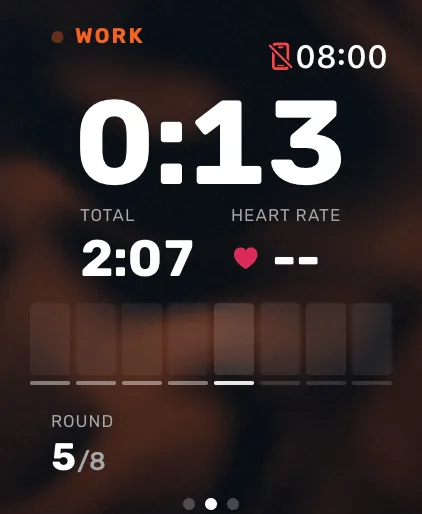
8 × 0:20 / 0:10). Set the work time, the rest time and the rounds with the slider or the Digital Crown, in 5-second steps. The total time shows underneath. Tap Done. - Start: press play. After the countdown, the first work interval starts.
- During the workout: the time left in the current work or rest interval leads the screen, white for work and orange for rest. For intervals of a minute or longer, the watch taps your wrist halfway and with 10 seconds to go; it always taps as the next interval starts.
- The end: the workout ends with the last work interval, without a final rest.
Atlon saves Intervals workouts to Apple Health as High Intensity Interval Training.
Common setups
| Workout | Work | Rest | Rounds |
|---|---|---|---|
| Tabata | 0:20 | 0:10 | 8 |
| 40/20 | 0:40 | 0:20 | as many as you plan |
| 1:00 on, 1:00 off | 1:00 | 1:00 | as many as you plan |
Limits
- Every round has the same work and rest. Intervals that change length need Just train, or the closest fixed setup.
- Rounds are counted by the timer, not by tapping.
- Work and rest come from the timer, so the screen follows the timer even if you rest early. Atlon still detects your real work and rest underneath, for your work time and points.
Related questions
- How do I set up an EMOM on Apple Watch?
- Can I use my iPhone as a gym timer?
- Functional vs traditional strength training vs HIIT on Apple Watch
- How is Atlon different from a WOD timer app?
Updated