
How do I count rounds with double tap on Apple Watch?
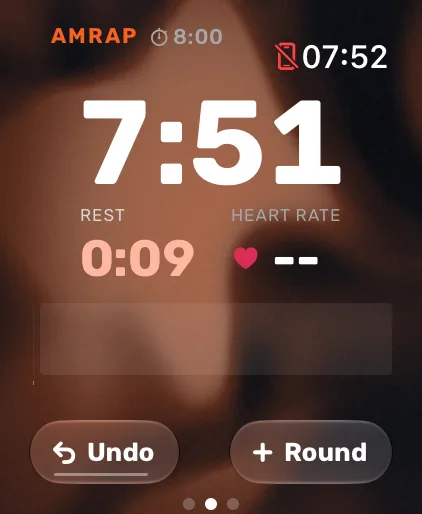
In Atlon’s Just train, AMRAP and RFT modes, tap your index finger and thumb together twice to count a round. It presses the Round button for you, so you don’t have to touch the screen with chalky hands. It works on Apple Watch models that support double tap, running watchOS 11 or later. On other watches, tap Round on screen.
How it works
- Start a Just train, AMRAP or RFT workout. The Round button sits on the workout screen.
- At the end of a round, double tap. The button flashes, the watch gives a tap on your wrist, and the round count goes up.
- In RFT, the button says Finish on the last round, and a double tap ends the workout.
- Counted by mistake? Undo replaces the button for 4 seconds. After that, use Undo round on the controls page.
Double tap works with your wrist raised and the screen awake, as everywhere on Apple Watch. Apple lists when it isn’t available, for example in Low Power Mode, with Sleep Focus on, or with the watch locked (Apple: Use tap gestures on Apple Watch).
Limits
- Which watches: double tap needs a watch that supports Apple’s double tap gesture, such as Apple Watch Series 9 or Ultra 2, and watchOS 11 or later for Atlon to use it. Check Apple’s list of supported models.
- Which modes: only the modes where you count rounds yourself: Just train, AMRAP and RFT. EMOM and Intervals count rounds with the timer.
- Double hits: a second round within 3 seconds of the last one is ignored, so a double tap that registers twice doesn’t add an extra round.
Related questions
- How do I set up an AMRAP on Apple Watch?
- How do I do rounds for time (RFT)?
- Which Apple Watch models work with Atlon?
Updated