
How do I enter a complex WOD (ladders, buy-ins, two exercises in one EMOM station)?
You don’t need to enter the structure on your watch. Pick the mode that matches the WOD’s clock (AMRAP, RFT, EMOM, Intervals, or Just train when nothing fits) and train. Atlon recognises the exercises and counts reps whatever the structure. Afterwards, snap the whiteboard on your iPhone, and the plan shows the ladders, buy-ins and stations.
How it works
The watch only needs to know the clock. The structure (what to do in each round) goes in the plan, added afterwards from the whiteboard, a screenshot or typed text.
| WOD | Mode on the watch | Settings |
|---|---|---|
| Ladder AMRAP (“3-6-9-12… in 12 min”) | AMRAP | 12:00; tap Round at the end of each rung if you want splits |
| Buy-in, then AMRAP | Just train, or AMRAP with the buy-in inside the cap | as the whiteboard says |
| Chipper (“50-40-30-20-10 for time”) | RFT | 1 round, with the cap if there is one |
| EMOM with two exercises per station (“every 1:00: 5 pull-ups + 10 push-ups”) | EMOM | 1:00 × the number of minutes |
| Alternating EMOM (“min 1 wall balls, min 2 burpees, 20 min”) | EMOM | 1:00 × 20 |
| “Every 2:00 for 5 sets” | EMOM | 2:00 × 5 |
| Mixed clocks in one class (strength, then a WOD) | one recording per part | see record the whole class |
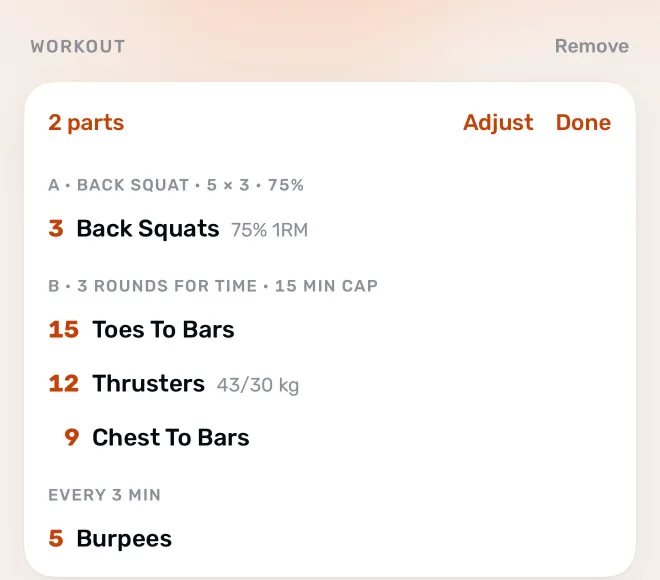
Then, on your iPhone, open the workout and tap Add the workout. A plan can hold buy-ins, ladders, stations that cycle each interval, rest between rounds or parts, and team workouts.
Limits
- The watch runs one clock per recording. If a WOD changes clock halfway (for example a 6-minute AMRAP, rest, then an EMOM), record each part separately, or use Just train for all of it.
- EMOM and Intervals use the same length for every round. Intervals that change length need Just train.
- You can’t build a WOD in Atlon and send it to your watch. The plan is added after you train.
- Ladders aren’t counted as rungs on the watch. Atlon counts the reps in each set; tap Round if you want a split per rung.
Related questions
- How do I set up an EMOM on Apple Watch?
- How do I set up an AMRAP on Apple Watch?
- How do I do rounds for time (RFT)?
- Should I record the whole class or just the WOD?
Updated