
Can Apple Watch track weightlifting?
Partly. Apple’s Workout app has Traditional and Functional Strength Training types that record the session’s time, heart rate and active calories, but they don’t count reps or log sets and weights. For that you need an app. Atlon’s Strength mode detects each set as you lift, names the exercise, counts the reps and logs the weight you set.
How it works
With Apple’s Workout app
Choose Traditional Strength Training or Functional Strength Training (Apple: Workout types on Apple Watch). You get the workout’s duration, heart rate and active calories, and it counts towards your Activity rings.
With Atlon’s Strength mode
- Open Atlon on your watch, swipe to Strength and press play. It starts straight away, with no countdown.
- Set the weight while you load the bar. Atlon shows your last set at a glance.
- Lift. Atlon detects the set, names the exercise and counts the reps. A short pause in the middle of a set, like re-racking for a few seconds, stays one set.
- Check the set card. When a set ends, its card shows the exercise, reps and weight. Change anything that’s wrong; if you correct the exercise, Atlon uses your correction for that exercise for the rest of the workout.
- Rest. A rest timer runs between sets.
- End. Atlon saves the workout to Apple Health as Traditional Strength Training, and your iPhone shows every set.
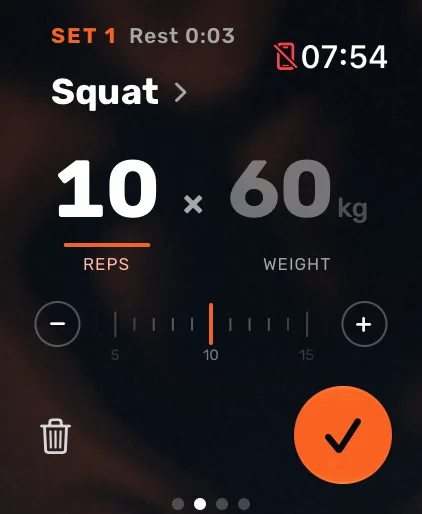
Recognised lifts include bench press, cleans, clean and jerks, deadlifts, front squats, overhead squats, shoulder-to-overhead, snatches and thrusters.
Limits
- The watch can’t tell how heavy the bar is. You set the weight, and Atlon shows your last set to start from.
- Variations aren’t told apart. A power clean and a squat clean are both a clean; push press and strict press are both shoulder-to-overhead. Pick the exact variation on the set card if you want it in your log.
- Exercises not on the list are logged as a set without a name. Pick the exercise on the set card.
Related questions
Updated