
How do I set up an AMRAP on Apple Watch?
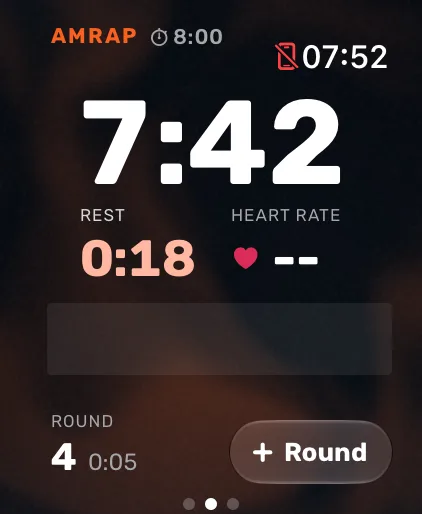
Open Atlon on your Apple Watch, swipe to AMRAP, tap the settings pill and set the time cap (1 to 90 minutes). Press play. The clock counts down while Atlon recognises your exercises and counts reps. Tap Round (or double tap on supported watches) as you finish each round. The workout ends by itself when time is up.
How it works
- Set it up: swipe to AMRAP and tap the pill (for example
12:00). − and + change the cap a minute at a time; the slider and Digital Crown reach every 15 seconds. Tap Done. - Start: press play. The countdown runs (5 seconds by default), then the AMRAP starts.
- Count rounds: at the end of each round, tap Round. On watches that support double tap, tap your finger and thumb together twice instead. Counted one by accident? Undo replaces the button for 4 seconds.
- Haptics: the watch taps your wrist halfway, with 10 seconds left, and at 3, 2, 1 before time.
- Time: at the cap, the workout ends and shows “Time!” with your rounds. Your results show points, rounds, heart rate, effort and the exercises Atlon recognised.
The clock shows time left by default. To count up instead, change AMRAP clock in Atlon’s watch settings.
Limits
- Rounds are counted by you, not detected. If you forget to tap, the round isn’t counted, but your sets and reps still are.
- Two taps within 3 seconds count as one round, so a double hit doesn’t add a round.
- An AMRAP where the work changes every round (for example a ladder) runs fine in AMRAP mode. To keep the plan with the workout, add it afterwards on your iPhone. See How do I enter a complex WOD?
Related questions
- How do I count rounds with double tap?
- How do I do rounds for time (RFT)?
- How do I set up an EMOM on Apple Watch?
- Can I use my iPhone as a gym timer?
Updated