Apple doesn’t publish what makes Functional Strength Training different from Traditional Strength Training on Apple Watch. Its support page lists both by name, with no description. Both record time, heart rate and active calories, and neither counts reps. In practice, the useful difference is how the session is built. Use Traditional Strength Training for lifting in sets with long rests (barbell, dumbbells, machines). Use Functional Strength Training for bodyweight, kettlebell and mixed circuits where you keep moving. Use HIIT when a clock sets the work and rest.
What’s the difference between functional and traditional strength training on Apple Watch?
Apple doesn’t say. Its page of workout types is a list of names: Functional Strength Training and Traditional Strength Training sit next to High Intensity Interval Training, Cross Training, Core Training and Mixed Cardio, with no description of what each is for or what it changes. The only guidance is a footnote saying you can choose Other when nothing matches (Apple).
What we can say is what every one of these types records: the session’s duration, your heart rate and an estimate of active calories, and the workout counts towards your Activity rings. None of them counts reps or logs sets.
So pick by what the words mean in training:
- Traditional strength training is lifting a load in sets: squats, deadlifts, bench press, Olympic lifts, dumbbell rows, machines. Few reps, heavy-ish weight, long rests.
- Functional strength training is strength work built from whole-body movements, often in circuits: pull-ups, push-ups, kettlebell swings, lunges, carries, dumbbell complexes. Lighter loads, shorter rests.
Does the workout type change the calories?
Apple doesn’t document whether it does. Apple says the watch uses your personal information, such as height, weight, gender and age, to estimate calories (Apple: Calibrate your Apple Watch). It doesn’t say what part the workout type plays, so no one outside Apple can tell you which type gives “more accurate” calories for a lifting session.
What we do know is that lifting is where the watch’s calorie estimate is roughest. In a 2026 lab study, Apple Watch heart rate closely matched an ECG during a resistance session, but its calorie estimate was about twice what indirect calorimetry measured: 299 kcal against 141 kcal (Lee et al., 2026). Whatever type you pick, treat strength-day calories as a rough guide. More in how accurate Apple Watch calories are for HIIT.
The practical rule: use the same type for the same kind of session, so your history compares like with like.
What does a traditional strength session actually look like?
Mostly rest. In Atlon’s Strength sessions, the median athlete spent 13% of the session lifting. The rest was resting, loading the bar and setting up. The median session was 16 minutes long, with 7 sets of 2 exercises and 92 seconds between sets.
That long, steady rhythm of short efforts and long rests is what “traditional strength training” means on the watch. If your session looks like this (a squat day, a bench session, working up to a heavy single), pick Traditional Strength Training.
And a functional or conditioning session?
Mostly work. The same data for sessions run against a clock:
| Session (Atlon mode) | Share of time working (median) | Rest between sets (median) | Length (median) |
|---|---|---|---|
| Strength | 13% | 92 s | 16 min |
| EMOM | 20% | 30 s | 10 min |
| Just train (open sessions) | 36% | 16 s | 25 min |
| Intervals and Tabata | 41% | 13 s | 10 min |
| Rounds for time | 49% | 13 s | 13 min |
| AMRAP | 53% | 13 s | 14 min |
An AMRAP or a round-for-time workout is about half work, with rests between sets of around 13 seconds: long enough to drop the kettlebell and pick up the jump rope. That’s the territory of Functional Strength Training, Cross Training or HIIT, not Traditional Strength Training. EMOMs sit in between: you work hard at the top of each minute and rest the remainder (see what an EMOM is).
Functional strength training vs HIIT: which is it?
Ask who sets the rest. If a clock does (Tabata’s 20 seconds on and 10 off, 40/20 intervals, a round every minute), it’s High Intensity Interval Training. If you do, moving through a circuit of strength movements and resting when you need to, it’s Functional Strength Training. Workouts that mix lifting, gymnastics and cardio against the clock fit Cross Training, Functional Strength Training or HIIT; pick one and keep using it.
What about Core Training, Cross Training and Mixed Cardio?
They’re all on Apple’s list, and again Apple doesn’t describe them. Going by what the words mean:
| Session | A sensible type |
|---|---|
| Heavy lifting in sets: squats, deadlifts, bench, Olympic lifts, machines | Traditional Strength Training |
| Bodyweight, kettlebell and dumbbell circuits | Functional Strength Training |
| Timed work and rest: Tabata, 40/20, intervals | High Intensity Interval Training |
| A workout mixing lifting, gymnastics and cardio (a WOD or metcon) | Cross Training (or Functional Strength Training or HIIT, used consistently) |
| A session of planks, sit-ups, hollow holds and other ab work | Core Training |
| Cardio machines and moves in a row: row, bike, ski, jump rope | Mixed Cardio |
| Nothing fits | Other |
This table is our suggestion, not Apple’s.
What if one session has both?
Many classes do: a strength block, then a short conditioning piece. You have two options. Record it as one workout and pick the type of the bigger part, or end the first workout and start a second one with a different type for the second part. Two workouts give each part the right label; one is simpler. For how Atlon handles a class recorded in pieces, see should I record the whole class or just the WOD?
Can any of these types count reps or log sets?
Not on their own. Apple’s strength types record the session as a whole: time, heart rate and calories. The lifting itself (which exercise, how many sets, how many reps) isn’t recorded. For that you need an app that reads the watch’s motion sensors.
Atlon does that in every mode. It recognises the exercise from the movement of your wrist, counts the reps and splits the session into sets, with nothing to press. Its exercise detection is >96% accurate and rep counting >92%. You can correct an exercise, and Atlon remembers. For the lifting side, see can Apple Watch track weightlifting?
Atlon also picks the workout type for you, from the mode you train in:
| Atlon mode | Saved to Apple Health as |
|---|---|
| Strength | Traditional Strength Training |
| Intervals | High Intensity Interval Training |
| Just train, AMRAP, RFT, EMOM | Cross Training |
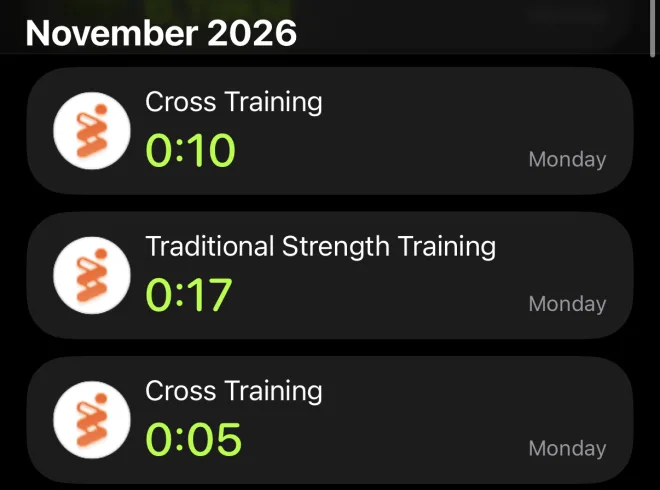
The workout still counts towards your rings, with your heart rate and calories, like any workout started in Apple’s Workout app (does Atlon sync with Apple Health?). For everything else about tracking a gym session on your wrist, see the complete guide to tracking WODs and HIIT on Apple Watch.
The data
Method. Atlon’s 30,000 most recent workouts between 1 minute and 2 hours long, recorded on Apple Watch, excluding test and deleted workouts, grouped by the mode the athlete chose. Share of time working is the time inside recognised sets divided by the workout’s length, per workout; the table shows the median. Rest is the gap between two recognised sets in the same workout, including moving between stations and loading the bar; gaps over 10 minutes are left out. Every figure is based on at least 100 athletes. Atlon users mostly do functional fitness with an Apple Watch, so they aren’t a random sample of everyone who trains.
How to cite this: Atlon, “Functional vs traditional strength training on Apple Watch”, November 2026, https://atlon.app/blog/posts/functional-vs-traditional-strength-training-apple-watch/
Get Atlon free on the App Store
Sources
- Apple Support. Workout types on Apple Watch.
- Apple Support. Calibrate your Apple Watch.
- Lee TH, Jun DU, Bae JY, Roh HT, Cho SY. Comparative validity of smartwatch-derived heart rate and energy expenditure during endurance and resistance exercise. Sensors, 2026;26(8):2526.
- Atlon: aggregate data from the 30,000 most recent workouts (method above)