Atlon 4.3 puts your watch and your plan together. Add the day’s workout (snap the whiteboard, paste a screenshot or type it) and Atlon matches it to what your Apple Watch recorded. Every set gets the planned movement, reps and weight, in the right round, and anything the watch couldn’t see is filled in from the plan. You can add the plan on Home before you train, or on the workout afterwards.
Why match a plan to the watch?
Because the watch sees movement, and the whiteboard knows the rest. Atlon recognises exercises from the motion of your wrist: its exercise detection is >96% accurate and rep counting >92%. But some things a wrist can’t tell: which variation of a clean the board asked for, how heavy the bar was, or a sled push that barely moves your hands. The plan knows all of that. Matching the two gives you a workout that’s both: the timing and effort your watch measured, with the names, reps and weights the whiteboard says.
It also replaces fixing sets by hand. Earlier versions had a set editor; 4.3 removes it. To fix a workout’s sets, add its plan.
How do I add the workout?
Two ways, depending on when you have it.
- Before you train: on Home, under What’s the workout today?, snap the whiteboard or type or paste the workout. It goes on your first workout of the day.
- After you train: open the workout in the Workouts tab and tap Add the workout.
You can send up to two pictures with a line of text, for example “we did 4 rounds”. Atlon’s AI writes it up in a few seconds as the workout’s plan: its title, its parts and a line per movement, with reps and loads.
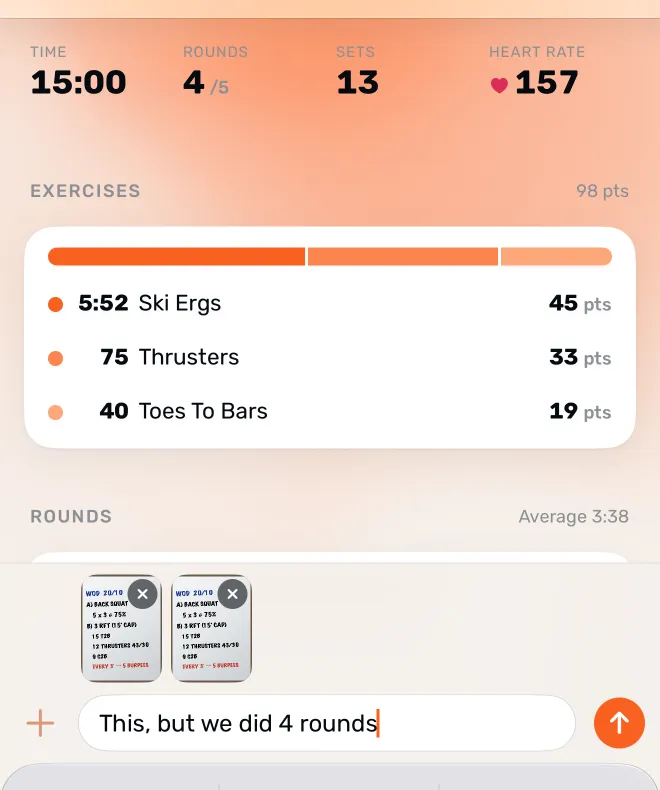
If something’s off, tap Adjust and say it in your own words: “thrusters were 50/35”, “only did part B”, “rowed instead of running”. Atlon shows what changed, with Undo. Tap Done to save.
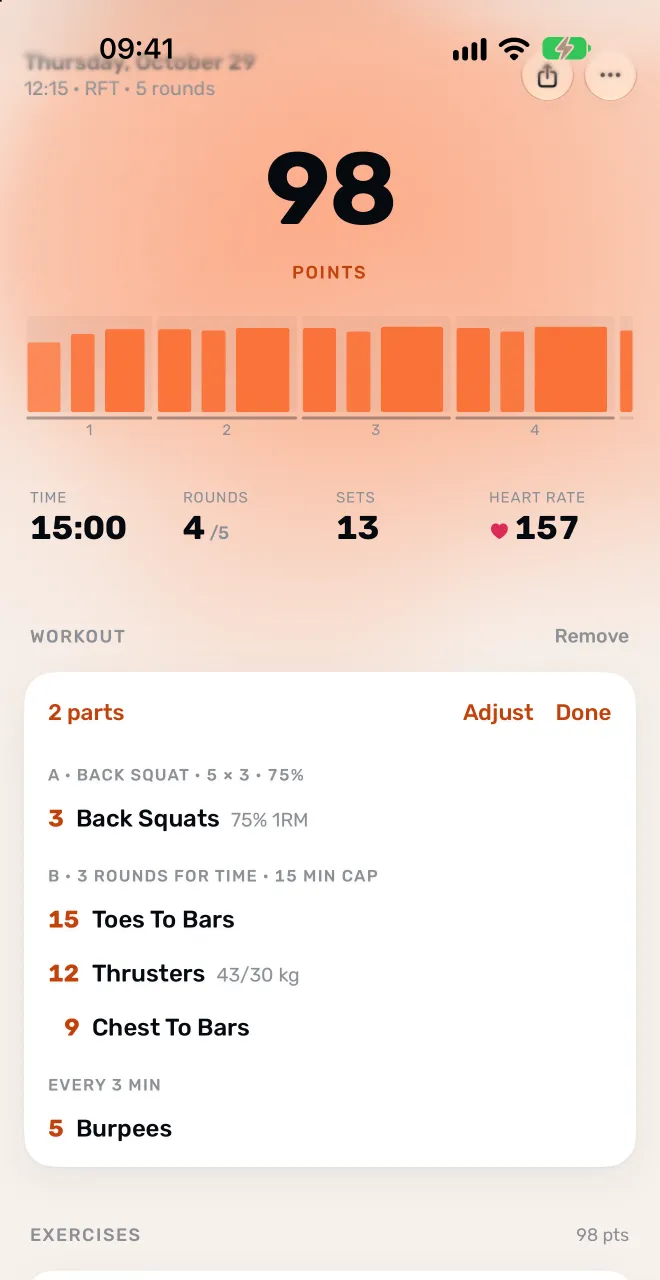
What does the match decide?
Where every set belongs, and what it counts. Once the plan and the recording are both there, Atlon puts each set your watch detected in its place in the plan: the part, the round and the movement. Then the plan’s numbers decide what counts:
| In the workout | What counts |
|---|---|
| A finished for-time workout or round | The plan’s reps. A finished 21-15-9 counts 45 of each |
| A finished AMRAP round | The round’s reps from the plan. The last, unfinished round counts what the watch saw, up to the plan’s number |
| Every interval of an EMOM | The plan’s numbers for each minute you reached, with the stations rotating as the board says |
| A movement you swapped (“rowed instead of running”) | The movement you did, with the plan’s numbers |
| A planned movement the watch missed | Its reps from the plan, with no points |
| A number the plan leaves open, like max reps | What the watch counted |
Points stay honest: each set’s points go to the movement the plan says you did, and a movement the watch didn’t see scores no points, because points come from the work your watch measured.
What kinds of workouts can a plan describe?
The ones on a real whiteboard. A plan can hold warm-ups and cool-downs, lettered parts (A, B, C), AMRAPs, for-time with caps, EMOMs and “every 2:00” workouts, alternating and rotating EMOMs, intervals and Tabata, buy-ins and cash-outs, ladders, chippers, rest between rounds or parts, partner and team workouts, strength sets at a percentage of your 1RM, and named benchmark workouts.
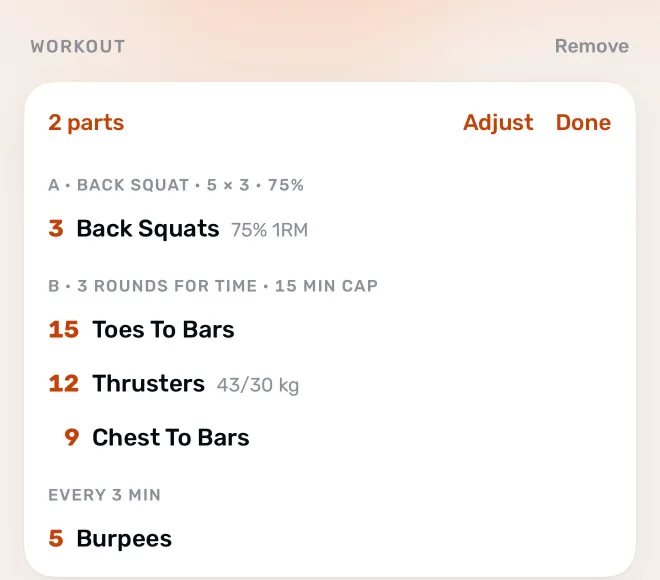
A class recorded in pieces (warm-up, strength, WOD) takes one plan, which covers all its recordings. See should I record the whole class or just the WOD? and how do I enter a complex WOD?
What else is new in 4.3?
- Today, on Home. Home now opens on today’s workout: points, time, heart rate and every set at a glance, with the plan right there.
- Share a workout. Send any workout as a link. Friends see it in a browser, even without Atlon. Stop sharing whenever you like (what someone sees).
- Easier to start. Try Atlon before you make an account. Setup is down to three screens, and Get started on Home shows you the rest, one step at a time. Lifters in the US and Canada now start in lbs.
- And more. A redesigned Settings, Variety on Home showing which movement patterns to train more, and fixes for the big screen’s beeps, background syncing and the Workouts tab.
What are the limits?
- The plan doesn’t set up your watch. Pick the mode and timer on the watch as usual. See workout formats explained for which mode fits which clock.
- It needs an internet connection, and what you type and the photos you send are read by a third-party AI service.
- Blurry or partial photos may not read. Atlon says so; try a sharper photo or type it.
- Points come from the watch. A movement filled in from the plan counts its reps but scores no points.
For the step-by-step, see how do I add today’s WOD from the whiteboard? and how do I correct an exercise or rep count? For everything else about training with your watch, see the complete guide to tracking WODs and HIIT on Apple Watch.